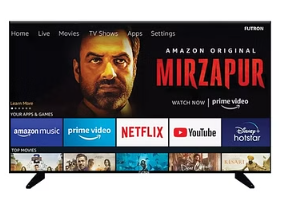
Smart LED TV with Full HD Display
Transform your entertainment with the Smart LED TV with Full HD Display. Featuring crisp 1080p resolution and built-in streaming apps like Netflix and Prime Video, this sleek TV delivers vibrant visuals and effortless access to your favorite content. Perfect for modern living spaces!
Smart LED TV with Full HD Display – Redefining Home Entertainment
Transform your living room into a mini-theatre with this stylish and affordable Smart LED TV, designed to bring you the perfect blend of technology, performance, and elegance. Priced at just ₹8499, this television offers a feature-rich experience that fits seamlessly into modern lifestyles.
🔹 Stunning Full HD Display
Enjoy crystal-clear picture quality with a 1080p Full HD resolution that delivers sharp details, vibrant colors, and immersive visuals. Whether you’re watching your favorite movies, binge-watching web series, or streaming live sports, every frame feels lifelike and engaging.
🔹 Smart Connectivity at Your Fingertips
With built-in streaming apps like Netflix, Prime Video, YouTube, and more, endless entertainment is just a click away. No need for extra devices – enjoy direct access to the latest shows, trending movies, and exclusive web content right from your TV screen.
🔹 Sleek & Modern Design
Crafted with a slim bezel and a minimalist finish, this Smart LED TV adds a premium touch to your interiors. Its lightweight and space-saving design make it an ideal choice for bedrooms, living rooms, or even office setups.
🔹 Immersive Sound Experience
Equipped with powerful speakers, this TV ensures clear, balanced, and dynamic audio that perfectly complements the stunning visuals. From dialogues to background scores, enjoy theatre-like sound from the comfort of your home.
🔹 Seamless Performance
Backed with advanced smart technology, this TV offers smooth navigation, quick app loading, and effortless switching between content. Connect via Wi-Fi, HDMI, or USB ports for maximum convenience and endless entertainment options.
✅ Key Features at a Glance:
1080p Full HD Display for superior picture clarity
Pre-installed apps like Netflix, Prime Video, YouTube
Wi-Fi & multiple connectivity options (HDMI, USB)
Slim & stylish design to enhance modern décor
Cinematic audio quality for an immersive experience
Best-in-class price of ₹8499
Bring home the Smart LED TV with Full HD Display today and elevate your everyday entertainment with stunning visuals, smart features, and unbeatable value!
Features & Benefits
🔹 Full HD 1080p Resolution
Benefit: Enjoy crystal-clear visuals with sharp details and vibrant colors, making movies, shows, and sports more lifelike.
🔹 Built-in Streaming Apps (Netflix, Prime Video, YouTube & more)
Benefit: Instant access to your favorite content without needing extra devices – convenience at your fingertips.
🔹 Smart Connectivity (Wi-Fi, HDMI, USB)
Benefit: Connect effortlessly to the internet, gaming consoles, or external drives for endless entertainment options.
🔹 Sleek & Modern Slim-Bezel Design
Benefit: Enhances the look of your living space, blending perfectly with modern interiors.
🔹 High-Quality Sound System
Benefit: Delivers clear, immersive audio for a cinematic experience right at home.
🔹 Lightweight & Space-Saving Build
Benefit: Easy to set up in any room, whether mounted on the wall or placed on a stand.
🔹 User-Friendly Interface
Benefit: Smooth navigation and quick app access, making it easy for all age groups to operate.
🔹 Affordable Price at ₹8499
Benefit: Premium entertainment features at a budget-friendly price, giving you the best value for money.
Usage Instructions
1️⃣ Unboxing & Setup
Carefully unbox the TV and remove all packaging materials.
Place it on a stable surface or mount it on the wall using compatible brackets.
Connect the power cable securely.
2️⃣ Connecting the TV
Plug in the TV to a power outlet and press the power button.
Connect to Wi-Fi using the remote (Settings > Network > Wi-Fi).
For external devices, use HDMI/USB ports (e.g., set-top box, gaming console, pen drive).
3️⃣ Initial Setup
Follow the on-screen instructions to select your language and region.
Sign in to your Google/streaming accounts (for Netflix, Prime Video, YouTube, etc.).
Adjust picture and sound settings to your preference.
4️⃣ Watching Content
Use the Home/Smart Menu button on the remote to access apps.
Navigate to streaming services or switch input sources (HDMI/USB).
Adjust volume, brightness, or display mode based on your needs.
5️⃣ Maintenance & Care
Clean the screen with a soft microfiber cloth (avoid harsh chemicals).
Ensure proper ventilation to prevent overheating.
Disconnect from power during thunderstorms or long periods of non-use.
6️⃣ Troubleshooting
If Wi-Fi doesn’t connect, restart the router and TV.
For unresponsive apps, clear cache or reinstall the app.
If the TV freezes, unplug the power cord, wait 30 seconds, then restart.