
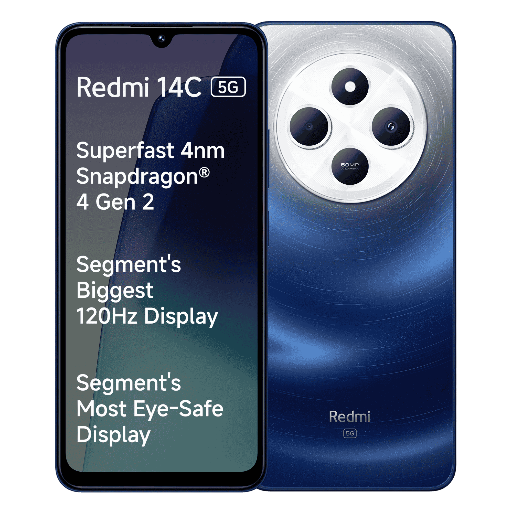
REDMI 14C 5G (Starlight Blue, 128 GB) (4 GB RAM)
₹10,499
₹13,999
4 GB RAM | 128 GB ROM | Expandable Upto 1 TB
17.48 cm (6.88 inch) HD+ Display
50MP Rear Camera | 8MP Front Camera
5160 mAh Battery
4 Gen 2 5G Processor
Quick Delivery
Secure Payment
Product Details
The REDMI 14C 5G in Starlight Blue combines cutting-edge technology and sleek design for an exceptional user experience. With lightning-fast 5G capabilities, 4 GB RAM, and 128 GB storage capacity, this smartphone ensures seamless multitasking and ample space for all your photos, apps, and files. The vibrant display and powerful camera system allow you to capture stunning photos and enjoy immersive media. Stay connected and productive on-the-go with the REDMI 14C 5G.
Features & Benefits
- 5G connectivity for ultra-fast internet speeds
- 128 GB storage capacity for ample space for photos, apps, and files
- 4 GB RAM for seamless multitasking and performance
- Vibrant display for immersive viewing experience
- Powerful camera system for stunning photos and videos
The REDMI 14C 5G enhances your mobile experience by offering lightning-fast 5G connectivity, ample storage space, seamless multitasking, stunning visuals, and high-quality camera capabilities. Stay connected, productive, and entertained wherever you go with this powerful smartphone.
- 128 GB storage capacity for ample space for photos, apps, and files
- 4 GB RAM for seamless multitasking and performance
- Vibrant display for immersive viewing experience
- Powerful camera system for stunning photos and videos
The REDMI 14C 5G enhances your mobile experience by offering lightning-fast 5G connectivity, ample storage space, seamless multitasking, stunning visuals, and high-quality camera capabilities. Stay connected, productive, and entertained wherever you go with this powerful smartphone.
How to Use
- To power on the REDMI 14C 5G, press and hold the power button until the device vibrates.
- To access the camera, swipe left on the home screen or tap the camera icon.
- Ensure to regularly update the software to enjoy the latest features and security enhancements.
- To optimize battery life, adjust the display brightness and enable power-saving mode when needed.
- Handle the device with care to prevent damage and use a protective case for added protection.
Keywords: REDMI 14C 5G, Starlight Blue, 128 GB, 4 GB RAM, smartphone, 5G connectivity, storage capacity, camera system, vibrant display, user experience.
- To access the camera, swipe left on the home screen or tap the camera icon.
- Ensure to regularly update the software to enjoy the latest features and security enhancements.
- To optimize battery life, adjust the display brightness and enable power-saving mode when needed.
- Handle the device with care to prevent damage and use a protective case for added protection.
Keywords: REDMI 14C 5G, Starlight Blue, 128 GB, 4 GB RAM, smartphone, 5G connectivity, storage capacity, camera system, vibrant display, user experience.