
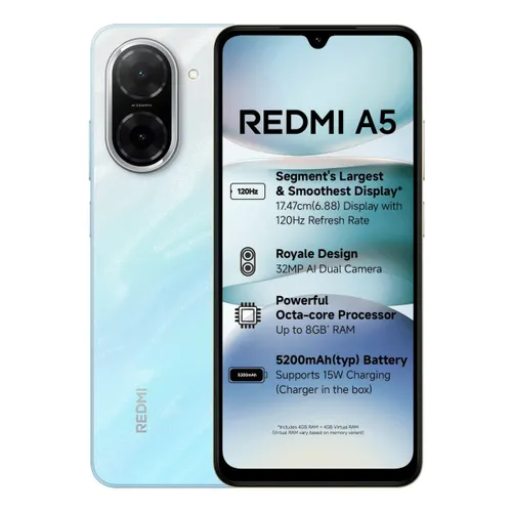
REDMI A5 (Pondicherry Blue, 64 GB) (3 GB RAM)
₹6,499
₹10,999
The REDMI A5 in Pondicherry Blue offers a perfect blend of style and performance with 64 GB storage and 3 GB RAM for seamless multitasking.
Quick Delivery
Secure Payment
Product Details
Elevate your mobile experience with the REDMI A5 in Pondicherry Blue. This sleek and stylish smartphone boasts 64 GB of storage and 3 GB of RAM, ensuring smooth performance and effortless multitasking. The vibrant display brings photos, videos, and games to life, while the powerful processor delivers lightning-fast speed. Capture stunning photos with the advanced camera features and enjoy all-day battery life for uninterrupted usage. With the REDMI A5, you'll enjoy a premium smartphone experience at an affordable price.
Features & Benefits
3 GB RAM | 64 GB ROM | Expandable Upto 2 TB
17.48 cm (6.88 inch) HD+ Display
32MP Rear Camera | 8MP Front Camera
5200 mAh Battery
T7250 Processor
How to Use
- To turn on the REDMI A5, press and hold the power button until the logo appears.
- Set up your phone by following the on-screen instructions for language, Wi-Fi, and account setup.
- To take photos, open the camera app and choose from various modes like portrait, panorama, and HDR.
- To maximize battery life, adjust screen brightness, enable power-saving mode, and close unused apps regularly.
- Set up your phone by following the on-screen instructions for language, Wi-Fi, and account setup.
- To take photos, open the camera app and choose from various modes like portrait, panorama, and HDR.
- To maximize battery life, adjust screen brightness, enable power-saving mode, and close unused apps regularly.